A while ago I built a small Kubernetes cluster using four Raspberry Pi 4s for local development and experimentation. I then added a private Docker registry so I could build and deploy my own container images locally without depending on Docker Hub.
With that setup I could build containers, push images and deploy workloads - but deployments were still manual. That meant I was applying manifests directly with kubectl, tweaking YAML locally, and wondering whether the cluster state actually matched what was in Git.
Argo CD + GitOps
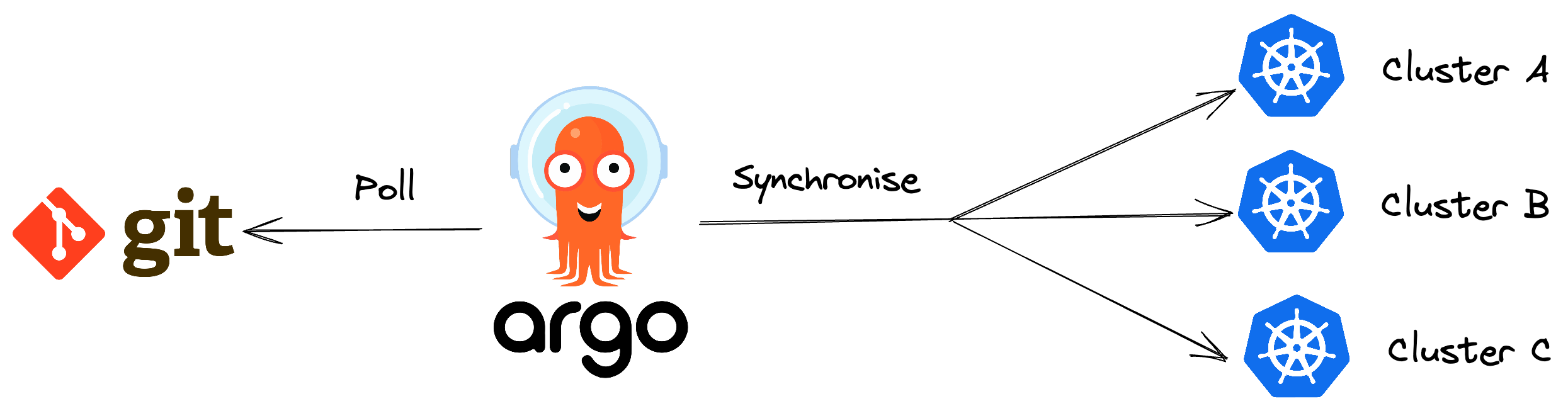
Argo CD is a GitOps continuous delivery platform for Kubernetes that keeps your cluster state synchronised with what’s defined in Git. Instead of manually applying manifests with kubectl, you declare applications, infrastructure, and configuration in a repository and Argo CD continuously reconciles the cluster towards that desired state. In practice, it gives you automated deployments, drift detection, self-healing, rollback capability, and a much clearer operational model where Git becomes the source of truth for your platform.
Installing Argo CD
Installing Argo CD on k3s is surprisingly straightforward.
First create the namespace:
kubectl create namespace argo-cd
Then apply the official install manifest:
kubectl apply -n argo-cd -f https://raw.githubusercontent.com/argoproj/argo-cd/stable/manifests/install.yaml
After a minute or two you should see the Argo CD pods starting:
kubectl get pods -n argo-cd
Exposing the Argo CD UI
Now, to expose Argo CD using an ingress, create argo-cd/infrastructure/ingress.yaml:
apiVersion: networking.k8s.io/v1
kind: Ingress
metadata:
  name: argocd
  namespace: argo-cd
spec:
  ingressClassName: traefik
  rules:
    - host: argo-cd.local
      http:
        paths:
          - path: /
            pathType: Prefix
            backend:
              service:
                name: argocd-server
                port:
                  number: 80
…and apply it to your cluster with:
kubectl apply -f argo-cd/infrastructure/ingress.yaml
Update your /etc/hosts:
192.168.1.10 argo-cd.local
At this point you should be able to log into the Argo CD UI at http://argo-cd.local:
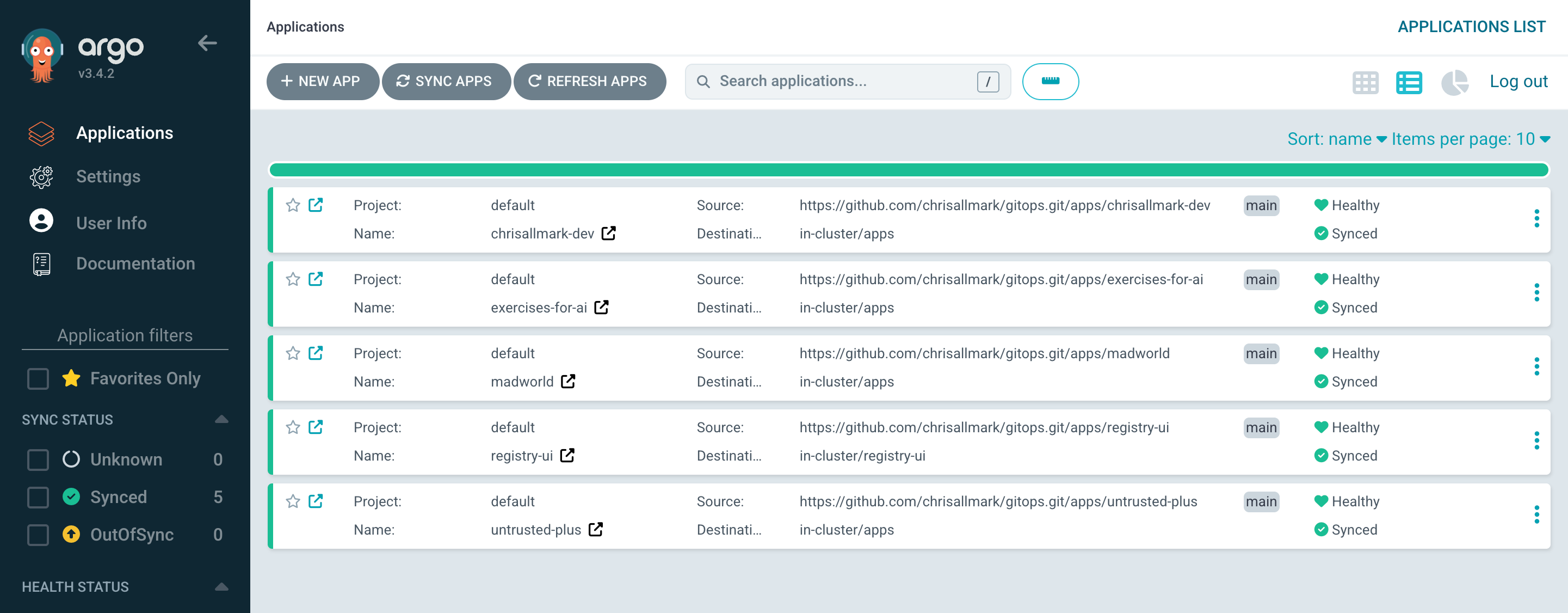
Note that you'll need to retrieve the initial admin password with:
kubectl -n argo-cd \
  get secret argocd-initial-admin-secret \
  -o jsonpath="{.data.password}" | base64 -d
Setting up a GitOps Repository
GitOps is an operational approach where Git becomes the source of truth for infrastructure and application deployment configuration. Instead of manually changing environments, you declare the desired state in version-controlled repositories and automated systems continuously reconcile the running platform to match. In practice, this gives you reproducible deployments, auditability, safer rollbacks, reduced configuration drift, and a much more predictable way to manage Kubernetes and cloud-native systems.
So we keep cluster state separate from application source code instead of putting Kubernetes manifests inside each application. There are endless opinions online about the “correct” GitOps structure but my GitOps repository is shaped like this:
gitops/
├── apps/
│   ├── an-app/
│   │   ├── deployment.yaml
│   │   ├── ingress.yaml
│   │   └── service.yaml
│   │
│   └── another-app/
│
└── argo-cd/
    ├── applications/
    │   ├── an-app.yaml
    │   └── another-app.yaml
    └── infrastructure/
        ├── ingress.yaml
        └── sealed-secret.yaml ← don't commit gitops-secrets.yaml!
Configuring Argo CD with GitOps Credentials
If your GitOps repository is private, Argo CD needs credentials so it can read the manifests it is responsible for syncing into the cluster. The simplest way to do this is with a standard Kubernetes secret in the argo-cd namespace.
For a GitHub repository, you can create a personal access token and store it as an Argo CD repository secret, so create gitops-secrets.yaml:
apiVersion: v1
kind: Secret
metadata:
  name: gitops-repo-credentials
  namespace: argo-cd
  labels:
    argocd.argoproj.io/secret-type: repository
type: Opaque
stringData:
  type: git
  url: https://github.com/chrisallmark/gitops.git
  username: chrisallmark
  password: <your-github-token>
… and apply it with:
kubectl apply -f gitops-secrets.yaml
Once this secret exists, Argo CD can authenticate against the private repository and pull the Kubernetes manifests defined in your GitOps repo and from there, your Application resources can reference the repo as normal.
PRO TIP: For a local cluster this is enough to get started, but it does mean the token is sitting in plain text in a YAML file before it is applied. That is fine for a quick local experiment, but I would not commit this file to Git. A better next step is to use Sealed Secrets, which lets you encrypt the secret and safely store the encrypted version in your GitOps repository.
Creating an Argo CD Application
An Argo CD application defines where manifests live, which cluster/namespace to deploy into and how reconciliation should behave.
Create your application manifests and commit them to your GitOps repository, for example:
apps/an-app/deployment.yaml
apiVersion: apps/v1
kind: Deployment
metadata:
  name: an-app
  namespace: apps
spec:
  replicas: 1
  selector:
    matchLabels:
      app: an-app
  template:
    metadata:
      labels:
        app: an-app
    spec:
      containers:
        - name: an-app
          image: k3s:5000/an-app:1.0.0
          ports:
            - containerPort: 3000
apps/an-app/ingress.yaml
apiVersion: networking.k8s.io/v1
kind: Ingress
metadata:
  name: an-app
  namespace: apps
spec:
  ingressClassName: traefik
  rules:
    - host: an-app.local
      http:
        paths:
          - path: /
            pathType: Prefix
            backend:
              service:
                name: an-app
                port:
                  number: 80
apps/an-app/service.yaml
apiVersion: v1
kind: Service
metadata:
  name: an-app
  namespace: apps
spec:
  selector:
    app: an-app
  ports:
    - port: 80
      targetPort: 3000
Now create an Argo CD application manifest, for example argo-cd/applications/an-app.yaml:
apiVersion: argoproj.io/v1alpha1
kind: Application
metadata:
  name: an-app
  namespace: argo-cd
spec:
  project: default
  source:
    repoURL: https://github.com/chrisallmark/gitops.git
    targetRevision: main
    path: apps/an-app
  destination:
    server: https://kubernetes.default.svc
    namespace: apps
  syncPolicy:
    automated:
      prune: true
      selfHeal: true
    syncOptions:
      - CreateNamespace=true
…and apply it with:
kubectl apply -f argo-cd/applications/an-app.yaml
Argo CD will poll your GitOps repository and start reconciling the application automatically - no more manual kubectl apply and no drift.
Finally update your /etc/hosts…
192.168.1.10 argo-cd.local an-app.local
…and hit http://an-app.local to view your app.
Finally…
Before GitOps the cluster still felt fairly experimental. Deployments were procedural, changes were often applied manually, and recovering the environment relied a little too heavily on memory and terminal history. It worked, but there was always a lingering question of whether the cluster state actually matched what was sitting in Git.
After moving to GitOps the whole setup feels much more declarative and predictable. Environments are reproducible, changes are versioned and auditable, and deployments become almost boring - which, operationally, is exactly what you want. The real value is not automation for its own sake. It is reducing ambiguity, drift, and operational guesswork so the platform behaves consistently and predictably over time.
I’m also increasingly interested in whether a small RPi cluster can act as a genuinely useful local platform engineering sandbox rather than just a Kubernetes science project.
So far, surprisingly… yes.